Survey builder
Discover what your audience thinks, needs and expects.
Create interactive surveys that invite participation, reveal valuable insights and help you build more relevant customer experiences.
What matters most to you when choosing a new service?
The next question adapts to the answer.
Why Survey?
Understand your audience. Make every answer count.
An interactive survey gives people a simple way to share what they think, and gives you the insight to improve what you offer.
Activate your audience
Give visitors something to take part in instead of another page to scroll through.
Understand customer needs
Discover what people think, need and expect from your products, services and experiences.
Make feedback engaging
Turn a traditional questionnaire into an experience people want to finish.
Turn answers into action
Use feedback to improve your offering and create more relevant customer journeys.
See it in action
A survey that listens to every answer.
Pick an answer and the next question adapts to it. This is a live SuperQuest survey.

What would make your experience with us better?
What would help you choose?
What kind of information would be most useful?
How would you like us to help you?
What would make your experience better?
Thank you for sharing your thoughts.
Your answers help us create a better experience. This is where your survey could continue – with relevant content, a product recommendation or an invitation to get in touch.
Create with Toaster
Build your survey in minutes.
No need to start with a blank page.
Tell Toaster, your SuperQuest AI assistant, what you’d like to learn about your audience and let it help you create the first version of your survey.
Get suggested questions and a starting structure that you can review, edit and customise. From customer feedback to market research, Toaster helps you get started while you stay in control.
- Type
- About
- Details
Feedback from first-time visitors to our online garden store – why they leave without buying, how easy it is to find the right products, and what would help them choose.
Make it yours
Ask the right questions, your way.
Not every question needs the same answer format.
Combine different question formats to create a survey that fits your audience and what you want to learn.
Multiple-choice questions
Let respondents choose from a selection of answers.
Open-ended questions
Give people space to share their thoughts in their own words.
Visual questions
Use images and other supporting content to make questions more engaging and easier to understand.
Collect & analyse
Every answer, in one place.
Follow the responses as they come in and explore them in the SuperQuest app.
Profiles, statistics and journeys
Explore responses one by one or as a whole.
Export your data
Download the responses and continue in your own tools.
Ask for a summary
Get an AI summary of what your audience is telling you, without reading every response.
- Profiles
- Statistics
- Journeys
- Ratings
- Answers
What do first-time visitors say about finding the right products?
No personal data is ever shared with the AI.
GDPR compliant.
All data is handled under GDPR and stored in the EU.
Your brand, your experience
Make it look and feel like your brand.
Every interactive experience should feel like a natural part of your brand.
Overall, how would you rate your stay?
Overall, how would you rate your stay?
Overall, how would you rate your stay?
Expand the options below to see how brand customisation works in SuperQuest.
Enter your website address and let SuperQuest use your existing website style as the starting point for your interactive experience.
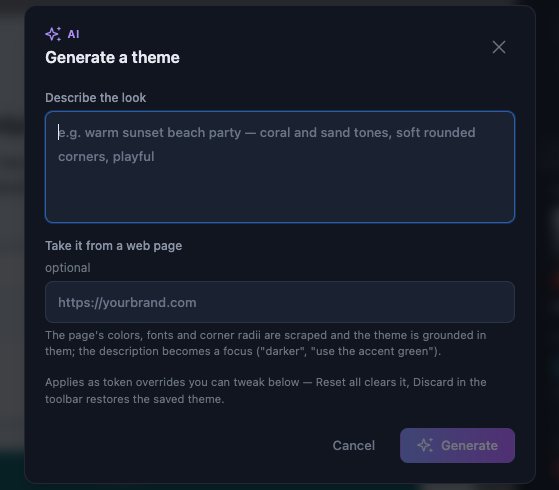
Upload your brand manual to bring your visual identity into SuperQuest.
Take control of the details with custom CSS and fine-tune the appearance to match your brand.
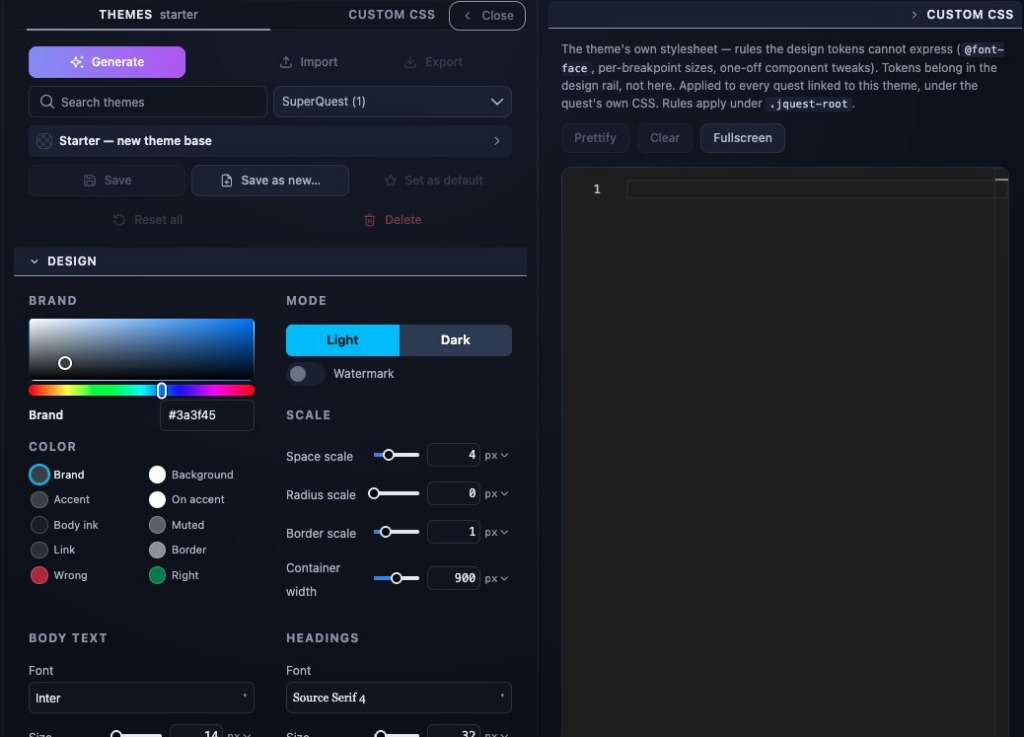
Don’t have brand guidelines? Start with one of our ready-made themes and create a polished experience without starting from scratch.

Use cases
A survey for every question worth asking.
Whether you want to improve your customer experience, test a new idea or understand your audience, a survey helps you hear the people behind the answers.
Customer feedback
Find out what customers think about your products, services and experiences.
Market research
Explore customer needs, preferences and expectations before your next move.
Website feedback
Ask visitors about their experience and discover what would make your website more useful.
Events & campaigns
Collect feedback before, during or after an event or campaign.
Lead generation
Learn about visitor interests and needs before inviting them to connect with you.
Employee feedback
Give your team an engaging way to share their experiences and opinions.
Publish anywhere
Add your survey to your website. Or share it anywhere.
Create your interactive survey in SuperQuest and embed it directly into your existing website. Use our WordPress or HubSpot plugin, embed your survey on any other website or publish it as a standalone experience.
WordPress plugin
Add interactive surveys to your WordPress website using the SuperQuest plugin.
HubSpot plugin
Add interactive surveys to your HubSpot pages using the SuperQuest HubSpot plugin.
Website embed
Bring your survey directly into your existing website.
Standalone publishing
Publish your survey using your own domain or subdomain, or use a SuperQuest-hosted URL.
QR codes
From print to survey in one scan.
Create your survey, publish it and print a QR code that takes people straight to it.
The SuperQuest QR maker creates a code for your hosted survey in seconds. Put it on flyers, posters, packaging or event materials, and see how many people scan it.
Link straight to your survey
Choose a hosted survey or enter any URL.
Count every scan
The code uses a short link, so scans are counted automatically.
Change the destination after printing
Point the same printed code to a new survey whenever you need.
Track campaigns
Add UTM parameters to follow results in your analytics.
Get started
Ready to hear what your audience thinks?
Create your own survey with SuperQuest and turn feedback into an interactive experience.
One platform. Endless possibilities.
Survey is just one way to use SuperQuest. Combine surveys with quizzes, product finders, calculators, polls, forms, games and other interactive modules to create experiences that go beyond a single interaction.
- Product Finder
- Chooser
- Calculator
- Quiz
- Survey
- Rating
- Assessment
- Games
- Video Popup
- Gamification
- And more